How to use EasyCatalog for catalog production
Catalog Pages
Businesses who sell lots of different products need to market them through lots of different channels such as websites, email, social media and print. Ensuring that customers can easily access rich information about these products helps to promote sales.
Organising this information and styling it into attractive printed, PDF-based or flipbook catalogs has proven sales value, but requires an investment in effort and time that can be discouraging.
EasyCatalog based catalog production
EasyCatalog by 65Bit provides a means of producing great looking, up-to-date catalogs. Using the powerful features within EasyCatalog, with the assistance of the experienced and knowledgable team at Channel Studios, businesses around the world have quickly put processes in place:
- Making their catalog production faster and easier
- Creating catalogs that have become more effective sales tools
Key elements recommended for efficient catalog production
One or more Product Data Source
There needs to be a data source for your raw product information. This may be from your ERP, CRM, Website database or just from spreadsheets you maintain, and EasyCatalog can work well with any of these data sources. For maximum efficiency, more companies are investing in a dedicated Product Information Management system (PIM).
EasyStructure
Catalogs are not just a random bucket of product data, they are organised into specific structures. For instance, a catalog may be split into sections in a certain order, each with ordered subsections.
Perhaps products in these subsections are then assigned into specific ranges or spreads or individual pages, each containing product groups in an ideal sort order, with each product group having a specific subset of skus arranged in their required sequence. A Structure!
Such structures are notoriously difficult to create and maintain within PIMs, spreadsheets, ERP or CRMs, and particularly difficult to quickly visualise and overview. EasyStructure is a web-based tool from Channel Studios that provides creation, management and enrichment of such structures. It uses simple, easily understood visual hierarchies controlled using drag/drop moving, copy/paste and single-click to add nodes. These are then exported to become identically organised Data Panels in EasyCatalog, within InDesign.
EasyCatalog
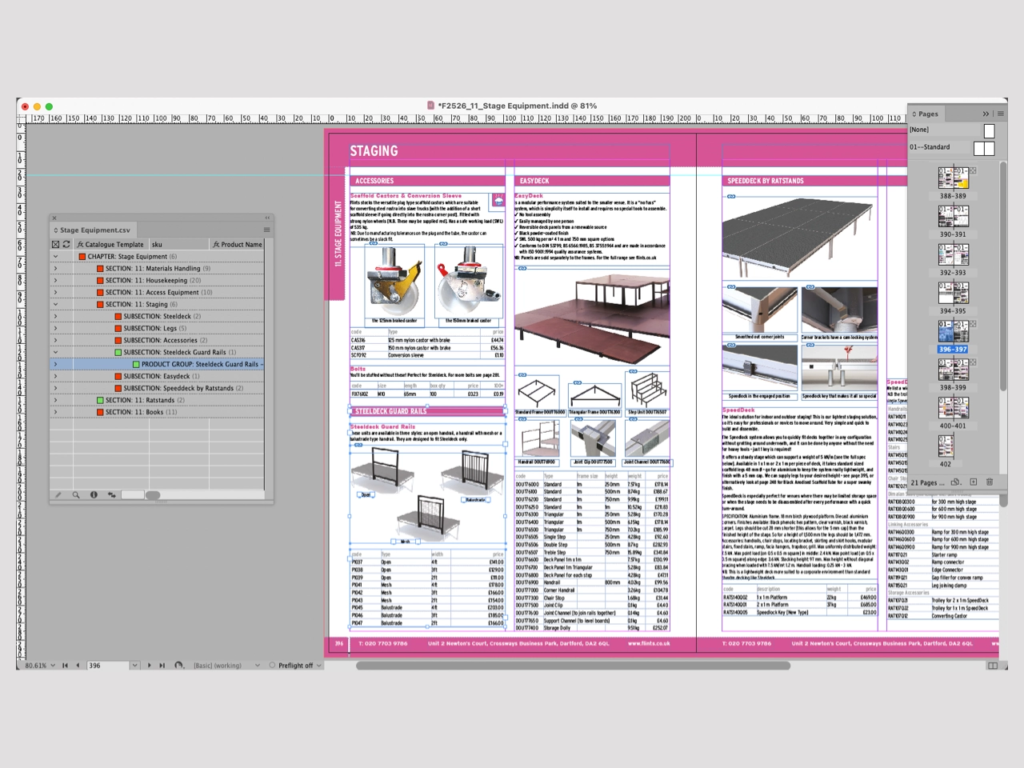
EasyCatalog is an InDesign plug-in that enables data sources to be shown and used within InDesign. This allows catalog pages, price lists, flyers, product data sheets etc, to be generated quickly and efficiently in a semi or fully automated fashion using the latest product data exports. As well as cutting large amounts of effort out of catalog production, this enables new marketing initiatives such as frequent flyer/web banner production, and the batch creation of up to date product data sheets.
EasyCatalog Data Panels

EasyCatalog excels at dealing with data from a wide range of sources. So whether your product data is from your website database, your ERP, a Product Information Management (PIM) system or just in spreadsheets and flat files, you can link it to Adobe InDesign using the tools and feature of EasyCatalog.
Where assistance is required, Channel Studios are specialists in product information management and of EasyCatalog and can configure processes for you.
You can have different product data fields coming from different sources. EasyCatalog can merge multiple data sources within Data Panels in InDesign to produce a complete data set. When EasyStructure from Channel Studios is added to the mix, the EasyCatalog Data Panel becomes a clear visual tree representing the catalog.
Catalog Page Creation

If pages are formulaic in nature, the EasyCatalog Pagination module can be used to generate multiple pages with a single click.
If pages need to be more design-led – using different layouts to optimise the selling power of each page according to its content – then EasyCatalog Library Items can be used to make an artworker’s life easier, by taking all the donkey work out of getting relevant styled product data and images onto page, where it can then be tweaked manually.
The data on page remains linked to the data source files via the EasyCatalog Data Panels. This means that the familiar proofing cycles of catalog production become much easier, as amends can be made to data sources (so that the product data is correct across ALL marketing channels), and then just right-click updated on page in InDesign.
Expertise in EasyCatalog is not required as Channel Studios is available to configure the solution to your needs.
Find out how Flints have utilised EasyCatalog to streamline catalog production: