
Build once, reuse everywhere, and let your data do the work.
EasyCatalog lets you transform your InDesign libraries and templates into fully dynamic components that populate automatically with the latest product data. Instead of placing static frames and manually updating every detail, you drag a ready-made design module onto the page and watch it fill itself with text, images and specifications drawn directly from your datasource.
It’s faster, more accurate, and far more scalable than traditional layout methods.
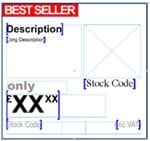
Design Templates That Populate Automatically
Create any InDesign library item or template you like — a product card, a multi-column module, a feature comparison block, or an entire page layout — then insert EasyCatalog Field Specifiers to define where your data should appear.
When you drag this item onto a page and select a record (or a group of records), EasyCatalog instantly replaces those placeholders with real content. Titles, descriptions, prices, icons, images, attributes and more all populate the moment you drop the item.
Your templates become smart, flexible building blocks for everything you produce.
Drag and Drop Your Pages Into Place
Assembling pages becomes as simple as choosing the records you want, selecting the appropriate library item, and dragging it into the layout.
- No copy-and-paste
- No manual typing
- No updating images by hand
- No risk of introducing inconsistencies
If the underlying data changes later — a price update, an image change, a new model name — your document updates in seconds with a single refresh. When you build with dynamic templates, your catalogue stays accurate automatically.
Maintain Consistency Across Every Publication
Dynamic templates ensure that every product tile, price box or feature panel looks exactly the way your brand intends. Designers create the layout once, lock the formatting, and let EasyCatalog handle the rest.
This approach is ideal when you produce:
- Large catalogues with repeating layout patterns
- Multi-brand or multi-region publications
- Datasheets that share a consistent visual structure
- Seasonal or promotional catalogues that reuse the same core components
Your design system stays intact, even as the content inside it constantly evolves.
Scale Your Workflow Effortlessly
Dynamic library items and templates are especially powerful when you’re working with hundreds — or thousands — of products. Drag, drop, populate. Repeat.
Teams benefit from:
- Faster page assembly
- Fewer layout errors
- Reusable components that speed up production
- Streamlined collaboration between designers and data teams
- A scalable system that supports growing product ranges
What used to take hours can often be completed in minutes.
Typical Use Cases
Dynamic templates are ideal for:
- Product tiles for catalogues, brochures or ecommerce printouts
- Technical datasheets that share the same structure across thousands of SKUs
- Retail catalogues with repeated “product block” styles
- Localised versions of the same publication (languages, regions, pricing tiers)
- Seasonal updates where only the content changes, not the design
- Large product grids, comparison pages and specification layouts
Any repeatable layout becomes dramatically easier to produce.
How It Works
- Design your library item exactly as you want it to appear, inserting Field Specifiers where you want data to flow (text, images, attributes, etc.)
- Select your record(s) in your EasyCatalog panel.
- Drag the item onto your page and watch it populate automatically.
- Refresh anytime to update the content with the latest data.
Simple, predictable and highly efficient.
Try It for Yourself
See how dynamic templates can transform your publishing workflow and save hours of manual layout time.