
Clean, structure and shape your product data — all inside InDesign.
Before your catalogue, brochure or datasheet hits the page, your data needs to be accurate, well-organised and ready for automation. EasyCatalog gives you full control over your product information directly inside InDesign, so you don’t have to jump back and forth between spreadsheets or databases.
Filter it. Sort it. Group it. Format it.
Your data becomes publication-ready — fast.

View & Manage Your Data in One Place
EasyCatalog displays your datasource in a familiar, spreadsheet-style panel inside InDesign. See all your fields and records at a glance, scroll effortlessly through thousands of items, and build lists and structures that match the way you publish.
No exporting. No re-importing.
Your data and your layout stay connected at every step.
Format & Clean Up Your Fields
Before data hits the page, it often needs a little polish. EasyCatalog lets you format and transform values without ever touching the source file.
- Apply number and currency formatting
- Convert dates into print-ready formats
- Standardise text (upper/lowercase, prefixes, suffixes)
- Build dynamic or calculated fields
- Remove unwanted spaces, symbols or coding artefacts
Perfect for cleaning up supplier data, normalising imported values or creating display-friendly output.
Filter, Query & Focus on What Matters
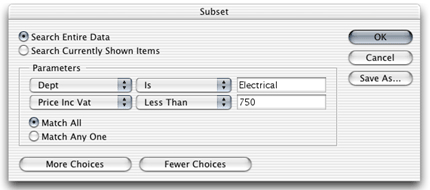
Need only products under £750?
Only items updated in the last week?
Only a specific brand, category or region?
EasyCatalog’s built-in filtering and query tools let you isolate exactly the records you need — perfect for price lists, seasonal ranges or targeted catalogues. Filters can be saved, reused and shared across your team for consistent workflows.
Sort & Group Your Data for Layout
Organise your content the way you want to publish it.
Your panel becomes a reflection of your desired page structure, making pagination faster and more accurate.

For instance, products could be sorted in price order within department. The order of products may be manually re-ordered by dragging each product into position.
Multiple, independent, views of data
Create Multiple Views of the Same Datasource
One datasource, many perspectives.
You can build multiple panels that all read from the same underlying data — each with its own filters, sorting rules and formatting.
For example, create panels that show:
- Sort by price, name, SKU, release date, or any field
- Group by brand, category, collection, product family — any level you choose
- Build multi-level hierarchies for complex catalogues
- Drag and drop to fine-tune ordering manually
Every view stays linked to the same source, ensuring consistency across your entire workflow.
Work with multiple data sources simultaneously
Working with multiple datasources? EasyCatalog keeps them neatly organised in separate panels. Each panel operates independently, so you can filter, configure and manipulate every datasource on its own terms — perfect for complex, multi-source projects.
Why This Matters
EasyCatalog empowers your team to:
- Clean and structure product data faster
- Reduce errors and inconsistencies before layout
- Avoid constant back-and-forth with spreadsheets
- Prepare catalogue sections in minutes, not hours
- Work smarter — with data tailored to the publication
- Keep InDesign as the central hub for your workflow
Accurate, organised data = reliable, automated publishing.
Typical Use Cases
- Preparing a seasonal catalogue by filtering products by date or price
- Creating grouped structures for brand, range or product families
- Tidying inconsistent supplier data before layout
- Building language-specific or region-specific subsets
- Cleaning up price fields, stock levels or technical specs
- Creating a publication view that differs from the database view
- Quickly assembling product lists for marketing campaigns
If you work with product data, you’ll use these tools every day.
Try EasyCatalog Free
Experience how simple it is to structure, clean and prepare your data for automated publishing.